LME Air-Gapped Installation Guide
Supported Operating Systems
This air-gapped installation process works on:
- Ubuntu 24.04
- Red Hat Enterprise Linux 9+
Important: The preparation machine and the target air-gapped machine must be running the same OS.
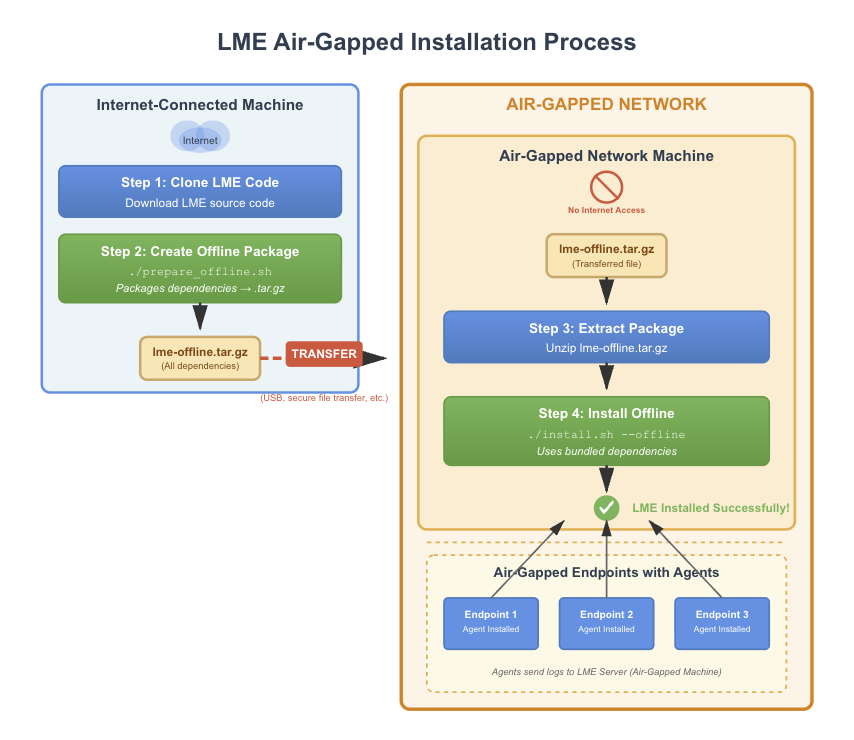
On Internet-Connected Machine (Preparation)
Prerequisites
Ensure git is installed on your system:
Ubuntu:
sudo apt-get update
sudo apt-get install git
Red Hat:
sudo dnf install git
1. Clone the Repository
git clone https://github.com/cisagov/LME.git
cd LME
2. Size and Volume requirements
The prepare script will use quite a bit of space. As it will be downloading many required packages and images. When you create your air-gapped machine ensure the root path has at least 50GB in order to create and store the files that get zipped into the tar.gz.
Your Air-Gapped machine must have enough space to both unzip these files, and then install them into the /opt/lme path. Ensure that the both the path you unzip at, and /opt/ have over 50GB of space to do a proper install.
/var/ path is where your logs will get saved via the Podman volume. Ensure this path has ample space if you aren’t going to be using an external storage device. Adjust your index management policies to fit the size you have here. (i.e. delete logs after 14 days instead of 30, etc)
3. Prepare Air-Gapped Resources (On the internet connected machine)
./scripts/prepare_offline.sh
This process will take upwards of 30 minutes and will:
- Download container images
- Download system packages
- Download agent installers
- Download CVE database
- Create a compressed archive with all resources
4. Locate and Transfer the Archive
When complete, you will find a .tar.gz file in your home directory (~/):
lme-offline-YYYYMMDD-HHMMSS.tar.gz
Transfer this archive to your air-gapped machine according to your organization’s security policy.
On Air-Gapped Machine (Installation)
Important: The air-gapped machine must be running the same OS as the preparation machine.
1. Extract the Archive
tar -xzf lme-offline-*.tar.gz
2. Navigate to LME Directory
cd LME
3. Run Air-Gapped Installation
./install.sh --offline
The installation script will automatically:
- Install required system packages
- Configure container runtime
- Load container images
- Set up CVE database
- Configure for air-gapped operation
- Complete the LME installation
4. Agent Deployment
Your air-gapped LME instance must be on a network where your air-gapped endpoints can reach it. Recommend using a python3 http server to install the agent.
- On the LME server:
cd ~/LME/offline_resources/agents/
python3 -m http.server 8000
This makes the agent resources available for download to the local endpoint.
- From an endpoint navtigate to
http://lme-server-ip-address:8000and download the agent you need.
Once you have downloaded the agent to the endpoint you can install it into fleet using the normal installation steps. You would just skip the download steps.